

More than half of website traffic now comes from mobile devices. That’s why Google uses mobile-first indexing. When Google evaluates your website, it primarily looks at the mobile version to determine rankings.
The challenge is that many businesses assume a website is mobile-friendly because it technically works on a phone. In reality, slow load times, difficult navigation, poor layouts, and usability issues can hurt rankings and conversions.
If you’re reviewing your website’s mobile SEO performance, start with this checklist.
Key Takeaways
- Ensure your website is truly mobile-friendly by providing a seamless experience across all screen sizes and devices.
- Improve mobile page speed to reduce bounce rates and keep visitors engaged.
- Monitor Core Web Vitals to identify and address user experience issues that can impact rankings.
- Simplify mobile navigation so visitors can quickly find important information and take action.
- Optimize images for mobile devices to improve load times without sacrificing quality.
- Make content easy to read on smaller screens with clear formatting, headings, and concise paragraphs.
- Optimize for local searches to capture nearby customers searching on mobile devices.
- Consider voice search behavior by creating content that answers conversational, question-based queries.
- Test your website on real devices to uncover usability issues that automated tools may miss.
- Track mobile performance regularly to catch problems early and maintain strong search visibility.
1. Make Sure Your Website is Truly Mobile-Friendly
A responsive website is the foundation of mobile SEO. Your site should automatically adjust to different screen sizes without forcing users to zoom in, scroll horizontally, or struggle to find information.
Review your site on multiple devices and ask yourself:
- Is the text easy to read?
- Are buttons easy to tap?
- Is the navigation intuitive?
- Can visitors quickly find information?
A website may technically work on a phone and still provide a poor user experience.
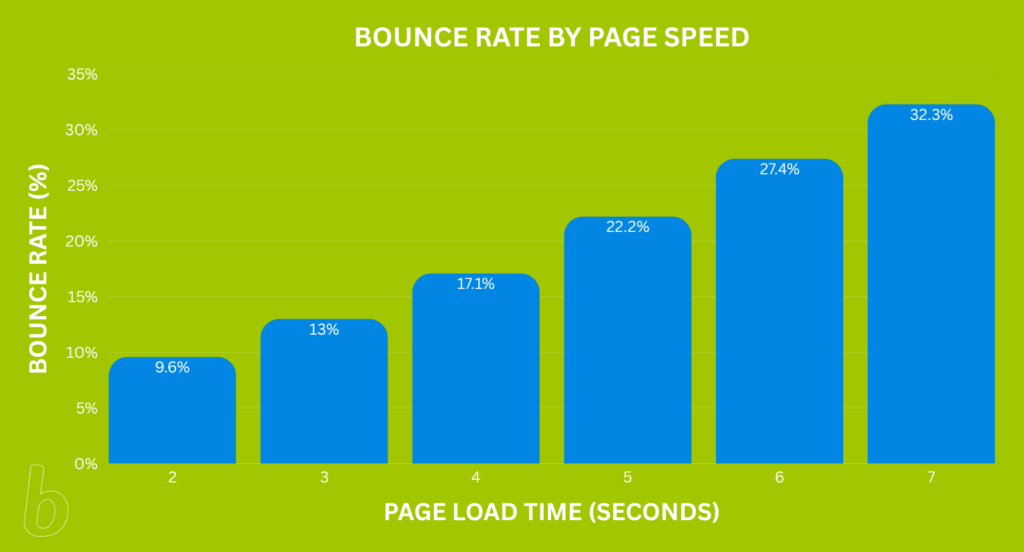
2. Improve Mobile Page Speed
Page speed remains one of the most important mobile ranking factors.
Mobile users often browse on slower internet connections and have less patience for delays. Even a few extra seconds can drastically impact bounce rates and reduce conversions.
Some of the most effective ways to improve page speed include:
- Compressing images
- Removing unnecessary scripts
- Leveraging browser caching
- Improving server response times
- Eliminating unused code
Google PageSpeed Insights is a useful tool for identifying performance issues and prioritizing improvements.
If your website loads slowly on mobile devices, an SEO audit will help identify performance issues that may be affecting both rankings and conversions.
3. Monitor Core Web Vitals
Core Web Vitals help Google understand how users experience your website. The three primary metrics include:
- Largest Contentful Paint (LCP): How quickly the main content loads (aim for under 2.5 seconds)
- Interaction to Next Paint (INP): How responsive the website feels
- Cumulative Layout Shift (CLS): How stable content remains while loading
If users experience delays, shifting layouts, or sluggish interactions, your Core Web Vitals may need attention.
4. Review Your Mobile Navigation
Website navigation should help visitors reach important information quickly. Mobile navigation does this too, but because of the small space, the design needs to change.
Complicated menus often create frustration on smaller screens and can lead to unnecessary exits. When reviewing your site’s navigation, check that:
- Contact information is easy to find
- Important service pages are accessible
- Menus function properly on mobile devices
- Key actions require minimal clicks
A clear navigation structure benefits both users and search engines!
5. Optimize Images for Mobile Devices
Large image files remain one of the most common causes of slow mobile websites. Every image should be properly sized and compressed before it is uploaded.
Best practices include:
- Using descriptive file names
- Adding relevant alt text
- Choosing modern image formats when appropriate
- Avoiding oversized image dimensions
Image optimization improves page speed while maintaining visual quality.
6. Make Mobile Content Easy to Read
Content that works well on a desktop monitor doesn’t always translate well to a smartphone.
Large blocks of text can quickly become overwhelming on smaller screens. To improve readability:
- Use shorter paragraphs
- Break content into logical sections
- Include bullet points where appropriate
- Use descriptive headings
- Leave adequate white space
The easier your content is to scan, the more likely visitors are to engage with it.
7. Optimize for Local Searches
Many mobile searches have local intent. People searching from their phones are often on the go and looking for nearby businesses, directions, hours of operation, or contact information.
To improve local visibility:
- Keep your Google Business Profile updated
- Ensure business information is consistent across directories
- Collect and respond to customer reviews
- Create location-specific content where appropriate
Local SEO and mobile SEO often work together to improve search visibility.
For businesses that rely on local customers, mobile SEO and local SEO often go hand in hand.
8. Consider Voice Search Behavior
Voice searches tend to be more conversational than typed searches. Someone researching hormone health might type:
“hormone replacement therapy Colorado Springs”
But when using a voice search, they may ask:
“Where can I find a hormone health clinic near me?”
Or:
“What are the symptoms of low testosterone?”
Creating content that answers common customer questions naturally can help improve visibility for voice-based searches. FAQ sections, educational blog content, and service pages that address common patient concerns are often well-positioned to capture these searches.
If your website already answers the questions potential patients ask during consultations, you’re likely creating content that aligns with how people use voice search.
9. Test Your Website on Real Devices
SEO tools provide valuable insights, but nothing replaces real-world testing.
Review your website on:
- iPhones
- Android devices
- Tablets
- Multiple browsers
Pay attention to usability issues, layout problems, and slow-loading pages that automated tools may miss.
10. Track Mobile Performance Regularly
Like all SEO, mobile SEO isn’t something you set up once and forget.
Website updates, plugin changes, design revisions, and new content can all affect performance.

Regularly monitor your website using:
- Google Search Console
- Google Analytics 4
- Google PageSpeed Insights
- Lighthouse
Routine monitoring helps identify issues before they begin affecting your rankings or conversions.
Mobile SEO Impacts More Than Rankings
Businesses often focus on mobile SEO because they want to improve search visibility. However, the same issues that affect rankings can also affect lead generation and sales.
Slow load times, poor navigation, and frustrating user experiences can cause visitors to leave your website before taking action. Improving mobile SEO often leads to better engagement, stronger conversion rates, and a better overall experience for users.
If your website traffic has plateaued or mobile conversions aren’t where they should be, a comprehensive SEO audit can reveal opportunities for improvement.
Need Help Improving Your Mobile SEO?
A mobile-friendly website should do more than pass a technical test. It should load quickly, rank competitively, and help visitors become customers.
At Brillity Digital, we help businesses identify mobile SEO issues, improve website performance, and create better experiences across all devices.
If you’re unsure whether your website is helping or hurting your online visibility, contact our team. We’d love to help!
FAQ
What is mobile SEO?
Mobile SEO is the process of optimizing your website so it performs well on smartphones and tablets. This includes improving page speed, navigation, readability, and overall usability. Because Google uses mobile-first indexing, the quality of your mobile experience can directly impact your search rankings.
Does mobile SEO affect Google rankings?
Yes. Google primarily evaluates the mobile version of your website, among other things, when determining how it should rank in search results. If your site loads slowly, is difficult to navigate, or provides a poor mobile experience, it may struggle to rank as well as competitors with stronger mobile performance.
How important is page speed for mobile SEO?
Page speed is one of the most important mobile SEO factors. Mobile users often expect websites to load quickly and may leave if a page takes too long to appear. Faster websites provide a better user experience, improve engagement, contribute to stronger search visibility, and lower bounce rates.
What are Core Web Vitals?
Core Web Vitals are performance metrics Google uses to evaluate user experience. They measure how quickly content loads, how responsive a website feels, and how stable the page remains while loading. Strong Core Web Vitals can help improve both user satisfaction and search performance.
Can improving mobile SEO increase conversions?
Yes. Mobile SEO improvements often lead to a better user experience, which can help turn more visitors into leads or customers. Faster load times, clear navigation, readable content, and easy-to-use forms make it easier for users to take action on your website, whether that’s making a purchase, requesting a quote, or contacting your business.